- Home >
- Blog >
- InfoSec Trends
Detecting the Exploitation of Pentesting Tools: Gaining Power Over PowerShell
- Jul 28, 2021
- Shubham Goel
- 5 minutes to read
Table of Contents
In our last blog post, we discussed pentesting tools in the wild and looked at how frequently these tools were exploited in recent attacks. In this post, we will go deeper into detection methodologies and what we should monitor to hunt for the artifacts. Here is the list from the last post.
| Attacks | Tools used |
| Darkside Ransomware | BloodHound/SharpHound, Mimikatz, Powerview, PSexec (Windows Utility – modified version usage) |
| Hafnium Exchange Server Vulnerability | Nishang, Powercat, Procdump, Covenant |
| Trickbot | PowerShell Empire, Metasploit, Cobalt Strike, Mimikatz, Lazagne, Bloodhound, AdFind |
| Emotet | Second/Third stage malware delivery via Ryuk Ransomware – Mimikatz |
| Solaris Zero-Day Attack | Mimikatz, Powersploit, Responder, Procdump, Crackmapexec, Poshc2 |
| Lockbit Ransomware | Crackmapexec |
If you look closely, there is a commonality among all the tools listed above. Can you find it?
All these tools have their vanilla versions (some tools are specifically built on PowerShell) but most of them have a PowerS hell version, too. Now the question arises why are all these tools based on PowerShell and what is offered by PowerShell that is so compelling for the attackers?
Before discussing the benefits, let’s find out more about PowerShell?
What is PowerShell?
PowerShell is a cross platform automation tool that can be used for object-oriented scripting, provides command line shell instructions and lets you run custom scripts/cmdlets.
There are several reasons it is so popular among attackers but the most common ones are –
- PowerShell offers a fileless attack process. You don’t need to drop malware to run the attack on the target’s machine. Attackers just need access to the box and can spin up PowerShell to call a remote file which would use malware/commands to perform actions on the target’s machine.
- PowerShell is loaded through system memory and is trusted by the OS since it’s an essential part of Windows.
- It provides unrestricted access to Windows API that can be used to interact with the OS to complete low-level tasks.
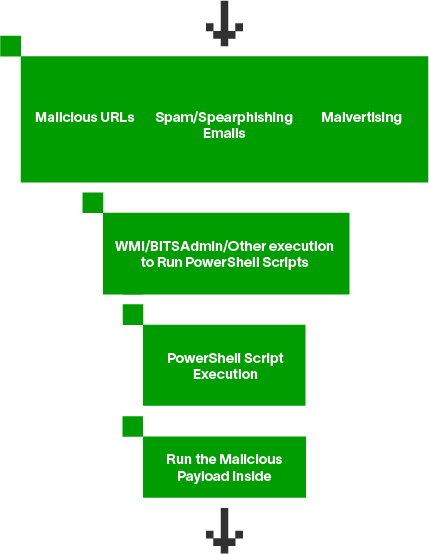
Now one could argue that if PowerShell is so popular among attackers why can’t we disable it for the entire organization or just restrict it to IT? The clear answer to this question is it is being commonly used by IT to perform tasks across the entire enterprise and this will hinder a lot of functionality for the team to make a trade off. We will discuss an option later in the post where we can opt to restrict the attacks, increase our monitoring capabilities and offer better coverage for detecting behavior in pentesting tools that are being used for attacks.
Managing logging
PowerShell comes with such a rich attack surface that the last thing you want to do is miss on the detection with disabled logging. Before we move on to the attacks, it is important to enable comprehensive logging to track key sources of PowerShell.
Audit Windows PowerShell
Within a policy, audit Windows PowerShell by navigating to Computer Configuration → Policies → Administrative Templates → Windows Components → Windows PowerShell
Enable module logging – Module logging includes command invocations and part of the scripts run by the user.
First select Turn on Module Logging and select the Enabled radio button.
Then enable logging all modules by selecting Module Names and entering * in the Value column
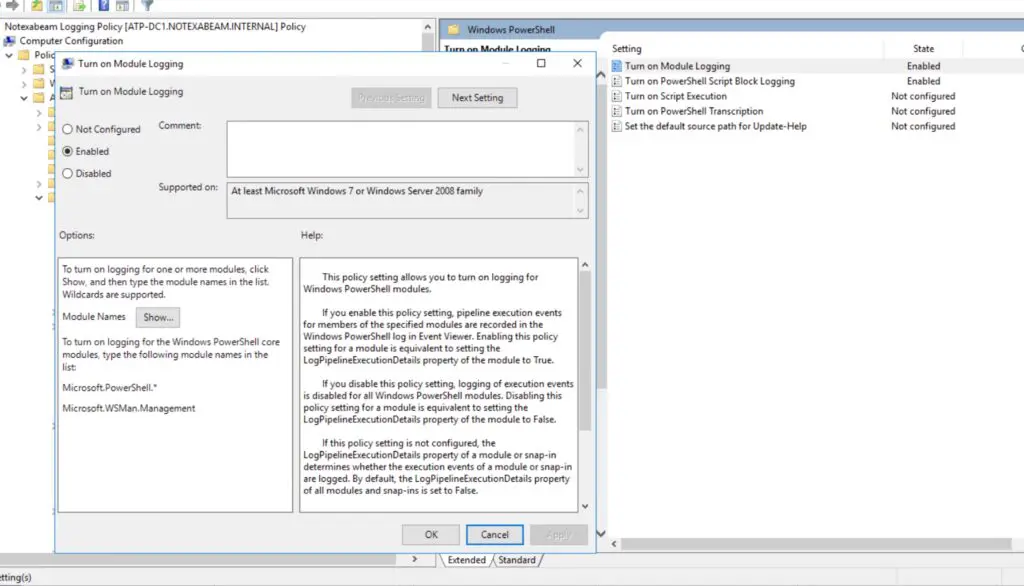
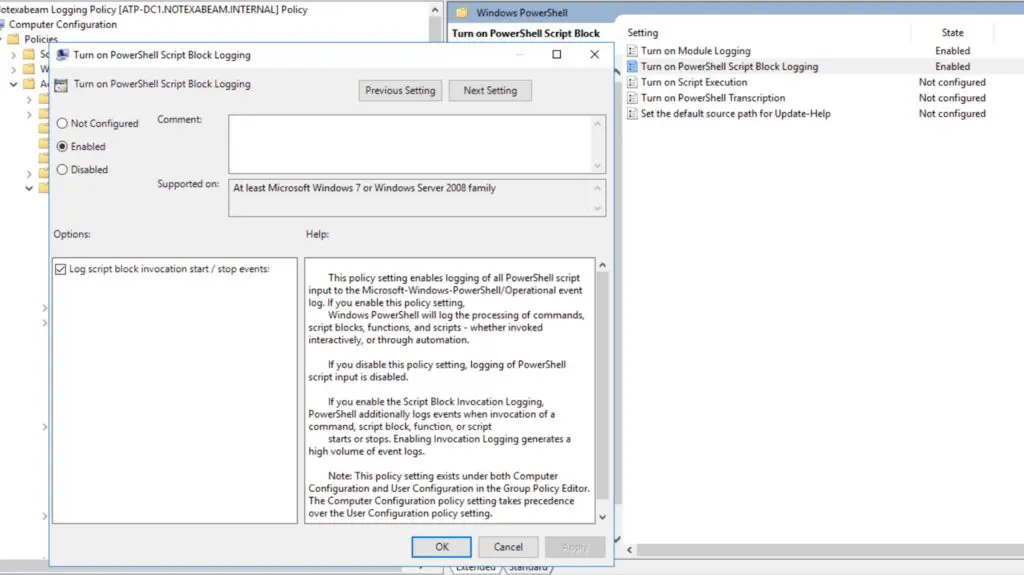
Enable script block logging: This step records code blocks and tracks the complete command and content of the script.
Select Turn on PowerShell Script Block Logging and select the Enabled radio button, making sure the Log script block invocation start/stop events box is checked.
Policy change detection
By default, Microsoft restricts some policies like only signed scripts can be run or you can run remote scripts but each IT team decides their own policy for the environment. You can read more about the PowerShell execution policies here. One common thing attackers need to do is to get the execution policies on the system and set the mode which is desirable for their tasks. This makes the execution policy monitoring super important and could help you detect an attack at a very early stage. Monitor usage of the following:
| Policy | Monitor for modifications |
| Get-Executionpolicy | List the effective execution policy for the current PowerShell session |
| Set-Executionpolicy | Change the PowerShell execution policy on Windows computer |
| ExecutionPolicy Bypass File | Bypass the execution policy for the certain script |
| Unrestricted | Unrestricted to allow local PowerShell scripts to run |
| Remotesigned | Requires a digital signature from a trusted publisher |
| HKEY_CURRENT_USERSOFTWAREMicrosoftPowerShell1ShellIdsMicrosoft.PowerShellExecutionPolicy | Registry modification for policy modification |
For any system, if you see these modifications for any peer group or a user, it might be important to trigger an alert and check if it is done by the user or a malware. In the past, this was like a prerequisite for all the malware to run the malicious script on the asset. By monitoring policy changes for PowerShell you can cut the time to detect by half and it will be a good headstart in threat hunting.
Obfuscation with PowerShell
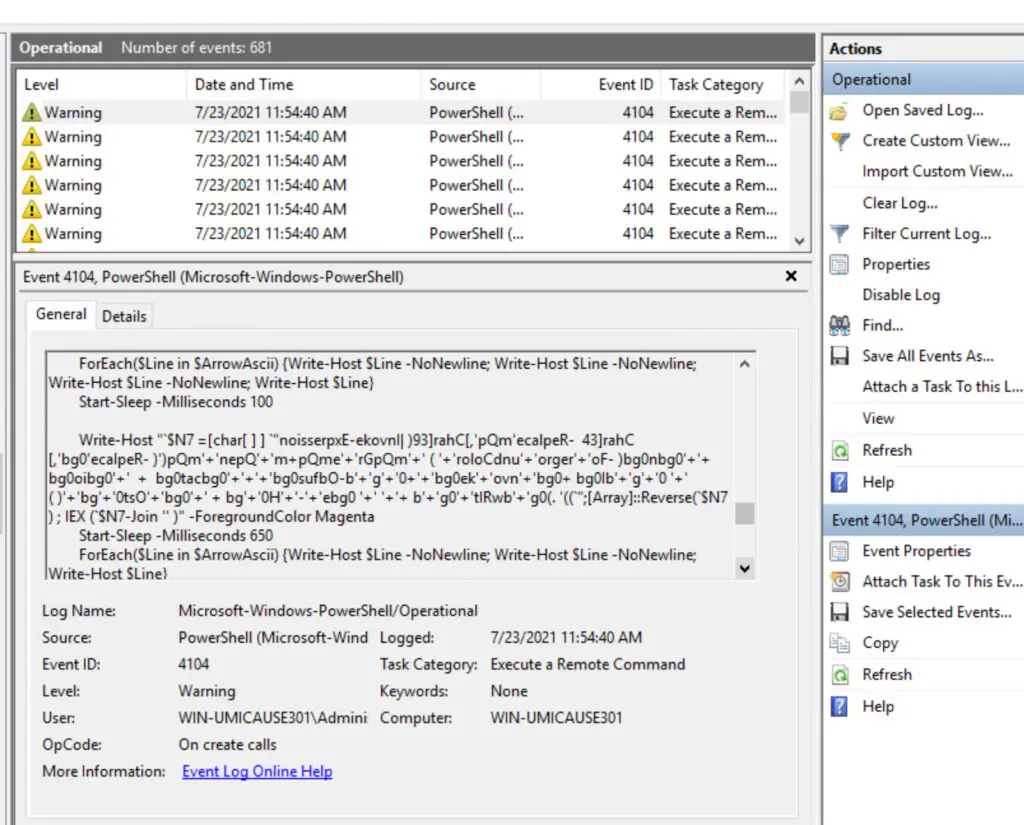
Adversaries often skilfully obfuscate the payload to avoid detection and even if the logging is enabled, analysts have a hard time identifying patterns and indicators of the attacks. That’s why detecting PowerShell is critical for any organization as it offers such a variety of attack scenarios since it’s a perfect and important ingredient for any attack.
There could be several commands and scripts that can be used to obfuscate the code. Attackers may use several modules like Invoke-Obfuscation or use the tobase64 string to encode the command in base64 encoding. Attackers could try several permutations to encode the command like -enc, -ENC, -encodedcommand, -Encodedcommand, -ec, -en etc. In addition to this, they will try to hide the window of execution from the user. Again, they could use -w hidden, -window hidden or any other scenario with the “hidden” keyword.
Tools detection
Every tool has a different scenario for detection since they all use different PowerShell cmdlets. A cmdlet acts as a small script that performs a specific function such as getting system details, running specific commands or changing directories.
In this section we will talk about some of the common detection scenarios for the PowerShell versions of these tools and how we can tune our monitoring to have a comprehensive coverage against these tools.
Let’s take the example of mimikatz, which is a credential-dumping tool.
Detection:
Attacker used an PowerShell cmdlet for mimikatz
Event Code: 4104
ScriptBlock: Invoke-Mimikatz
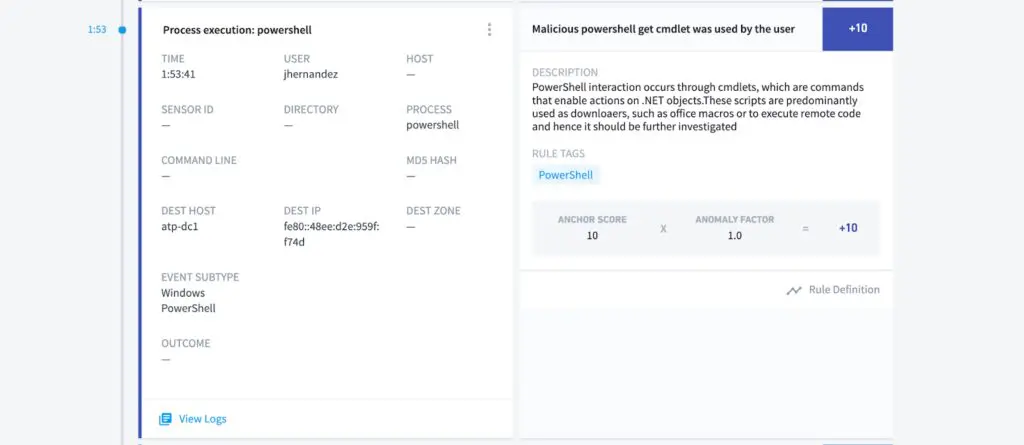
In addition to the above mentioned detection, Exabeam monitors any process that is accessing LSASS. LSASS is a memory space which holds the credential repository of Windows. Our behavior-based detection checks for any process that is calling LSASS for a read event. If you want to hunt for the artifacts in the logs, you can hunt for the following
Event Code: 4663
File Path: lsass.exe
Process Name: PowerShell.exe
Let’s look at one more example for detecting PsExec. PsExec is part of Microsoft’s Sysinternals suite, a set of tools to aid administrators manage their systems. PsExec allows for remote command execution (and receipt of the resulting output) over a named pipe with the Server Message Block (SMB) protocol. For the first level detection we need to identify the cmdlet.
Event Code: 4104
ScriptBlock: Invoke-psexec
Going one step further, we’ll map the behavior of the tool to enhance detection. For PsExec detection, we can look for uniquely created named pipes with the service. Named Pipes are shared memory used for processes to communicate with each other. Here are the artifacts for PsExec:
Event Code: 5145
File Path: stdout or stdin or stderr
In addition to the rule above, we have a service installation rule that tracks any abnormal service created on the user or the asset to track any psexec service creation which is most often the case with the tool.
There is a good cmdlet SIGMA rule created by Sean Metcalf, Florian Roth et al. which will help you create an exhaustive list for your environment. We don’t recommend this entire list as it may throw some false positives. However you can tune this list according to your environment.
As you can see it’s important to track the cmdlet but more importantly you need to detect the behavior behind the tools. Detecting the behavior is more effective as even if the attacker changes the name of the cmdlet, we are not reliant on just the surface-level detection. Additionally, none of this is possible with proper logging. With the exponential rise in PowerShell-based attacks, it is important to monitor the usage carefully that will aid in better detection.
- Tags
- Research
Learn More About Exabeam
Learn about the Exabeam platform and expand your knowledge of information security with our collection of white papers, podcasts, webinars, and more.
-
Guide
Four Ways to Augment Microsoft Sentinel With the Exabeam Microsoft Sentinel Collector
- Show More