


Detecting Negligent vs. Malicious Insider Threats: 8 Solutions That Can Help
- 20 minutes to read
Table of Contents
TL;DR: Insider threat detection solutions use behavioral analytics and data monitoring to tell negligent mistakes apart from deliberate misuse. Exabeam is best for behavior analytics across users and AI agents, Microsoft Purview for Microsoft 365 environments, Proofpoint ITM for forensic investigations, and Varonis for data-centric monitoring.
What Are Negligent and Malicious Insider Threats?
Insider threats are security risks that originate from people who have authorized access to an organization’s systems, networks, or sensitive data. These individuals may include employees, contractors, business partners, and former employees whose access has not been revoked. Negligent and malicious insider threats differ fundamentally in intent, operational patterns, and required organizational responses.
Negligent insider threats occur when authorized users unintentionally expose an organization to security risks. Common examples include sending sensitive information to the wrong recipient, using weak passwords, falling for phishing attacks, misconfiguring cloud storage, or transferring company files to unsecured personal devices. Although these actions are not intended to cause harm, they can lead to data breaches, malware infections, and unauthorized access.
Malicious insider threats involve individuals who intentionally misuse their authorized access to steal data, disrupt operations, or damage an organization. Their motivations may include financial gain, revenge, espionage, or personal benefit. Examples include employees stealing customer records, copying intellectual property before leaving a company, installing malware, or deliberately deleting critical files.
Key differences:
- Intent and motivation: Negligent insiders unintentionally create security risks through mistakes, carelessness, or lack of awareness. Malicious insiders deliberately misuse access for financial gain, revenge, espionage, or personal benefit.
- Common behaviors: Negligent activity includes accidental data sharing, weak passwords, phishing mistakes, and cloud misconfigurations. Malicious activity includes unauthorized data downloads, intellectual property theft, privilege abuse, and deliberate system disruption.
- Security and business impact: Both can cause data breaches, financial losses, regulatory penalties, and operational disruptions. Malicious incidents may involve targeted sabotage or theft, while negligent mistakes can cause equally severe damage.
- Detection challenges: Negligent activity often resembles routine work, while malicious insiders may conceal their actions or remain within authorized permissions. Both require behavioral monitoring and business context to distinguish suspicious activity from legitimate operations.
How to detect:
- Establish behavioral baselines: Track normal login patterns, application usage, file access, and data transfers for individual users and peer groups to identify unusual activity.
- Monitor hybrid and cloud environments: Collect user activity across on-premises systems, cloud services, SaaS applications, and endpoints to detect suspicious actions across environments.
- Apply user and entity behavior analytics (UEBA): Use statistical models, machine learning, and behavioral rules to detect unusual access, privilege changes, and data movement.
- Correlate security signals: Connect identity, endpoint, network, and application events to identify suspicious sequences that individual monitoring tools may miss.
- Detect unusual data access and exfiltration: Monitor bulk downloads, unauthorized sharing, and sensitive data transfers using data loss prevention (DLP) policies and activity analysis.
- Prioritize alerts with risk scoring: Evaluate behavioral deviations, data sensitivity, access privileges, and correlated events to identify activities requiring investigation.
- Centralize detection with SIEM: Aggregate security logs, correlate suspicious events, and maintain searchable activity histories to support insider threat investigations.
Negligent vs. Malicious Insider Threats: Key Differences
1. Intent and Motivation
The main difference between negligent and malicious insider threats is whether the individual intends to cause harm.
Negligent insiders create security risks unintentionally, often because of human error, insufficient security awareness, or failure to follow established procedures. They typically have legitimate reasons to access company systems but may not understand the risks associated with their actions.
Malicious insiders deliberately misuse their access to compromise systems, steal sensitive information, or disrupt business operations. Their motivations may include financial gain, revenge against an employer, corporate espionage, or personal interests. Some malicious insiders act independently, while others cooperate with external attackers in exchange for payment or other benefits.
2. Common Behaviors and Activities
Negligent insider activities typically involve mistakes or unsafe practices during routine work. Examples include sharing confidential documents with unauthorized recipients, reusing passwords, clicking phishing links, storing sensitive data on personal devices, and accidentally exposing cloud storage resources. These behaviors can create security vulnerabilities without the employee realizing it.
Malicious insider activities involve deliberate actions that violate security policies. Examples include downloading large volumes of confidential data, accessing information unrelated to job responsibilities, stealing intellectual property, disabling security controls, and deleting critical business records. Malicious insiders may also attempt to hide their activities by using unauthorized accounts, accessing systems outside normal working hours, or manipulating audit logs.
Related content: Read our guide to insider threat examples
3. Potential Security and Business Impact
Both negligent and malicious insider threats can result in data breaches, financial losses, regulatory penalties, and operational disruptions.
Negligent insiders may accidentally expose customer information, introduce malware into corporate networks, or cause service outages through incorrect system configurations. The severity of these incidents depends on the sensitivity of the affected data and the level of access involved.
Malicious insider threats can cause more targeted damage because attackers intentionally exploit their knowledge of internal systems and security controls. They may steal trade secrets, sabotage production environments, or compromise critical infrastructure. However, malicious intent does not always result in greater damage. A single negligent action, such as exposing a database containing millions of customer records, can have consequences comparable to a deliberate attack.
4. Detection Challenges
Negligent insider threats are difficult to detect because the underlying activities often resemble legitimate business operations. Employees regularly access sensitive files, exchange documents, and use corporate applications as part of their jobs. Security teams must distinguish harmless mistakes from activities that introduce significant risks without generating excessive false alerts.
Malicious insider threats present additional challenges because attackers already possess legitimate credentials and understand internal workflows. They may gradually extract data, operate within their assigned permissions, or modify their behavior to avoid detection. Traditional security tools that focus on external attacks may fail to recognize these activities as suspicious.
Detecting both types of insider threats requires visibility into user behavior, data access, and system activity. Organizations can use user and entity behavior analytics (UEBA) to identify deviations from normal activity, data loss prevention (DLP) tools to monitor sensitive information transfers, and access logs to investigate unusual actions. Combining these controls with contextual information, such as job responsibilities and access requirements, helps security teams distinguish genuine threats from normal employee behavior.
Why Is It Difficult to Distinguish Negligent from Malicious Insider Activity?
Legitimate Users Have Authorized Access to Sensitive Resources
Both negligent and malicious insiders typically use legitimate accounts to access corporate systems, applications, and sensitive data. Unlike external attackers, they do not necessarily need to bypass authentication controls or exploit security vulnerabilities. Their activities often fall within their assigned permissions, making unauthorized behavior difficult to identify.
For example, an employee may have legitimate access to customer records for daily business operations. Downloading those records could be necessary for a work-related task or part of an intentional data theft attempt. Access permissions alone cannot establish whether the activity is appropriate. Security teams need additional context, including the user’s role, normal access patterns, and the business purpose of the action.
Similar Activities Can Indicate Accidents or Intentional Misuse
Negligent and malicious insiders can perform nearly identical actions, even when their intentions differ. Sending confidential files to an external email address, copying data to a USB drive, or uploading documents to a personal cloud account may indicate either an accidental policy violation or deliberate data exfiltration.
For example, an employee might upload sensitive documents to personal cloud storage to continue working from home. Another employee might perform the same action to steal company information before leaving the organization. Both activities generate similar technical signals, making it difficult to determine intent from individual events.
Security teams must examine the surrounding circumstances to assess potential risks. Relevant factors include the volume and sensitivity of transferred data, the destination, the timing of the activity, and whether the behavior differs from the user’s established patterns. Even with this information, technical evidence may indicate suspicious behavior without conclusively establishing malicious intent.
Related content: Read our article about insider threat indicators
Traditional Rule-Based Detection Generates False Positives
Traditional security monitoring tools often rely on predefined rules and thresholds to identify suspicious activity. For example, a rule might generate an alert when an employee downloads more than a specified number of files, accesses systems outside business hours, or transfers data to an external destination.
However, these activities can also occur during legitimate business operations. A system administrator may download large datasets for maintenance, while a remote employee may access sensitive resources outside standard working hours. Static rules cannot reliably account for differences in job responsibilities, working patterns, and business requirements.
As a result, rule-based detection can generate large numbers of false positives that require manual investigation. Attackers may also avoid detection by keeping their activities below configured thresholds. Behavioral analytics can improve detection by comparing current activity with historical patterns and peer-group behavior, although unusual activity still requires investigation to determine its cause.
Lack of Visibility Across Identities, Endpoints, and Cloud Applications
Insider activity often spans multiple systems, including identity providers, corporate endpoints, SaaS applications, cloud storage, and on-premises infrastructure. Security tools may monitor these environments separately, making it difficult to reconstruct a complete sequence of user actions.
For example, an employee might access a sensitive document through a cloud application, download it to a managed laptop, and transfer it to an external storage service. An identity monitoring tool may record the successful login, while an endpoint security tool detects the file download. Without correlating these events, security teams may miss the connection between the actions.
Visibility gaps become more significant when employees use unmanaged devices, personal accounts, or applications that lack detailed audit logging. Organizations need centralized telemetry and consistent identity mapping to connect activities across environments. Correlating authentication events, file operations, application usage, and data transfers helps security teams assess whether a sequence of actions represents legitimate work, negligence, or deliberate misuse.
How to Detect Negligent and Malicious Insider Threats
Establish User and Entity Behavioral Baselines
Behavioral baselines help security teams understand how employees, service accounts, and other entities normally interact with corporate resources. These baselines capture typical:
- Login times
- Access locations
- Application usage
- File transfers
- Data access patterns
They provide a reference for identifying activities that differ from established behavior. For example, an employee who normally accesses a small number of customer records might suddenly download thousands of records within a short period. This deviation could indicate a compromised account, negligent behavior, or intentional data theft. Security teams should establish baselines for individual users and peer groups with similar responsibilities to distinguish suspicious activities from legitimate changes in workloads.
Behavioral baselines should also adapt to changes in job responsibilities, working schedules, and business operations. Regular updates help reduce false positives while maintaining visibility into unusual activities that may indicate insider threats.
Monitor User Activity Across Hybrid and Cloud Environments
Organizations need continuous visibility into user activity across on-premises infrastructure, cloud services, SaaS applications, and remote endpoints. Insider threats can involve multiple environments, particularly when employees access sensitive information through cloud applications or work from unmanaged devices. Monitoring should cover:
- Authentication events
- File access
- Administrative actions
- Application usage
- Data transfers
For example, security teams may need to track when an employee downloads confidential documents from Microsoft 365, copies files to a local device, or uploads information to an external cloud storage service.
Collecting activity logs from different environments allows security teams to reconstruct user actions and identify suspicious sequences. Monitoring should prioritize sensitive resources and high-risk activities while applying appropriate access controls and privacy safeguards to collected telemetry.
Detect Behavioral Anomalies with User and Entity Behavior Analytics (UEBA)
User and entity behavior analytics (UEBA) helps detect insider threats by identifying deviations from normal user and system behavior. UEBA solutions analyze historical activity and current security events using statistical models, machine learning, and behavioral rules to identify patterns that may indicate security risks. Examples of behavioral anomalies include:
- Unusual login times
- Unexpected access to sensitive databases
- Sudden increases in file downloads
- Administrative actions performed by accounts that rarely use elevated privileges
UEBA can also identify combinations of activities that appear harmless individually but become suspicious when analyzed together. For example, an employee who accesses an unfamiliar repository, downloads confidential files, and transfers them to an external destination may generate a higher-risk alert than an employee performing only one of these actions. UEBA does not determine intent directly, but it helps security teams prioritize activities that require investigation.
Correlate Identity, Endpoint, Network, and Application Security Signals
Individual security events often provide insufficient context to distinguish negligent behavior from malicious activity. Correlating telemetry from identity providers, endpoint detection and response (EDR) tools, network monitoring systems, and business applications helps security teams understand the complete sequence of user actions. For example:
- An identity system may record an unusual login
- An endpoint security tool may detect a large file download
- A network monitoring solution may identify an outbound transfer to an unfamiliar destination
Correlating these signals can reveal a potential data exfiltration attempt that individual tools might not identify. Effective correlation requires consistent user identifiers, synchronized timestamps, and sufficient event details across security systems. This enables analysts to connect related activities, reduce duplicate alerts, and investigate suspicious behavior with greater accuracy.
Identify Unusual Data Access and Potential Exfiltration
Monitoring sensitive data access and movement is essential for detecting both negligent and malicious insider threats. Security teams should identify:
- Unusual file downloads
- Bulk data exports
- Unauthorized sharing
- Transfers to unapproved destinations
Data loss prevention (DLP) solutions can inspect data transfers and enforce policies based on information sensitivity, file classification, and destination. For example, DLP controls may alert when an employee attempts to send customer records to a personal email account or upload confidential documents to an unauthorized cloud service.
Detection should also consider the volume, frequency, and timing of data access. An employee downloading large amounts of intellectual property shortly before leaving the organization may require investigation. However, similar behavior could be legitimate during a project handover, so analysts should validate the business context before concluding that an insider threat exists.
Apply Risk-Based Scoring to Suspicious User Activities
Risk-based scoring helps security teams prioritize insider threat alerts according to their potential impact and the strength of the available evidence. Instead of treating every policy violation equally, risk models assign scores based on factors such as:
- Behavioral anomalies
- Data sensitivity
- Access privileges
- The number of correlated security events
For example, an employee accessing an unfamiliar application may receive a relatively low risk score. If the same employee subsequently downloads sensitive records, disables a security control, and transfers files to an external destination, the combined activity may produce a substantially higher score.
Risk scores can support automated responses, such as requiring additional authentication, restricting sensitive data transfers, or escalating incidents for analyst review. Organizations should regularly evaluate scoring models against confirmed incidents and false positives to ensure that alerts reflect meaningful security risks.
Use Security Information and Event Management (SIEM) for Centralized Detection
Security information and event management (SIEM) platforms provide centralized collection, analysis, and correlation of security events across an organization’s infrastructure. They help security teams detect insider threats by combining logs from:
- Identity systems
- Endpoints
- Network devices
- Cloud services
- Business applications
SIEM detection rules can identify suspicious activities such as repeated access failures followed by successful authentication, unexpected privilege changes, bulk file downloads, and unauthorized data transfers. Integrating SIEM with UEBA and DLP solutions provides additional behavioral and data context for investigating these events.
SIEM platforms also support incident investigation by maintaining searchable event histories and generating alerts when predefined detection conditions are met. Security teams can use these capabilities to reconstruct user activity, identify affected resources, and determine the scope of potential insider incidents.
Insider Threat Detection Solutions at a Glance
The table below summarizes the key differences between the insider threat detection solutions in this guide. We explore each one in more detail below.
| Category | Solution | Best For | Key Strengths | Things to Consider |
| Behavioral Analytics Platforms | Exabeam New-Scale Security Operations Platform | Insider threats across users, service accounts, and AI agents | Behavioral baselines, long-running timelines, risk scoring | Dashboard and report customization has room to grow |
| Behavioral Analytics Platforms | Securonix UEBA and AEBA | Adding behavior analytics to a SIEM or Microsoft Sentinel | Intent signals, peer-group analytics, privacy-aware cases | Customization and custom connectors take effort |
| Behavioral Analytics Platforms | Gurucul AI-Powered Insider Risk Management | Regulated industries needing behavior analytics with DLP | 450+ integrations, HR and sentiment context | Alert severity tuning and documentation |
| Insider Risk Management and Data Protection | Microsoft Purview Insider Risk Management | Microsoft 365 environments needing built-in insider risk policies | Agentless policy templates, pseudonymization, adaptive DLP | Third-party data sources need extra work |
| Insider Risk Management and Data Protection | Proofpoint Insider Threat Management | Investigating careless, malicious, and compromised users | Activity timelines, screenshots, sentiment analysis | Short in-platform data retention |
| Insider Risk Management and Data Protection | DTEX Platform | Distinguishing malicious, careless, and compromised behavior | 500+ metadata elements, intent-based risk models | Custom enterprise pricing only |
| Insider Risk Management and Data Protection | Mimecast Incydr | Data exfiltration by departing employees and shadow AI | Visibility without policies, adaptive controls | Initial configuration and alert tuning |
| Insider Risk Management and Data Protection | Varonis Data Security Platform | Insider access to sensitive files in cloud and on-prem | Hundreds of threat models, least privilege automation, MDDR | Setup, initial scanning, and tuning effort |
Notable Insider Threat Detection Solutions
How we selected these solutions: We shortlisted insider threat detection solutions based on behavioral analytics, user activity and data movement monitoring, risk scoring, and investigation capabilities.
Behavioral Analytics Platforms
1. Exabeam New-Scale Security Operations Platform

Best for: Detecting insider threats across users, service accounts, and AI agents
Strengths: Behavioral baselines with long-running timelines and risk scoring
Things to consider: Reporting and dashboard customization has room to grow
Exabeam detects insider threats that hide in authorized activity by users, service accounts, machines, and AI agents. The platform learns normal behavior for human and non-human identities and connects activity over time. It combines user and entity behavior analytics (UEBA), Agent Behavior Analytics (ABA), and dynamic risk scoring into a unified threat detection, investigation, and response workflow.
Exabeam can run as a full platform through New-Scale Fusion, or as New-Scale Analytics on top of an existing SIEM such as Splunk, Microsoft Sentinel, or IBM QRadar. Long correlation windows and the stateful Session Data Model link behaviors that unfold over weeks or months into a single sequence of related actions.
Key features include:
- Behavioral baselines for every identity: Learns normal activity for users, service accounts, machines, and AI agents, and flags deviations even when the access involved is authorized.
- Credential misuse detection: Identifies unusual use of valid credentials by combining behavioral baselines, identity context, and long-running timelines.
- Data leakage correlation: Adds behavioral context to DLP, authentication, access, and application events so analysts can separate routine file movement from suspicious transfers.
- Privileged access and escalation monitoring: Baselines privileged activity and tracks credential and permission changes over long periods to expose gradual or automated escalation.
- Audit tampering and data destruction detection: Correlates retained and late-arriving evidence to expose gaps in logs, and flags unusual deletion patterns by users and automated processes.
- At-risk user identification: Correlates HR signals with behavioral changes to surface users whose activity suggests emerging insider risk.
- Physical access correlation: Combines badge, identity, geolocation, and system activity to detect badge misuse or impossible travel.
- Agent Behavior Analytics: Applies one behavioral risk model to humans and AI agents, detecting abnormal tool use, risky access, and actions outside an agent’s intended role.
- MITRE ATT&CK mapping: Outcomes Navigator maps detection coverage to ATT&CK tactics and techniques, including lateral movement over RDP, SMB, SSH, VNC, DCOM, and WinRM.
Limitations (as reported by users on PeerSpot):
- Dashboard customization: Some users would like more options for customizing dashboards and case management views.
- Reporting filters: Reviewers note that reports could offer additional filtering, such as sorting by the most recent detection.
- Pricing expectations: Some users mention that the cost was somewhat higher than they initially expected.

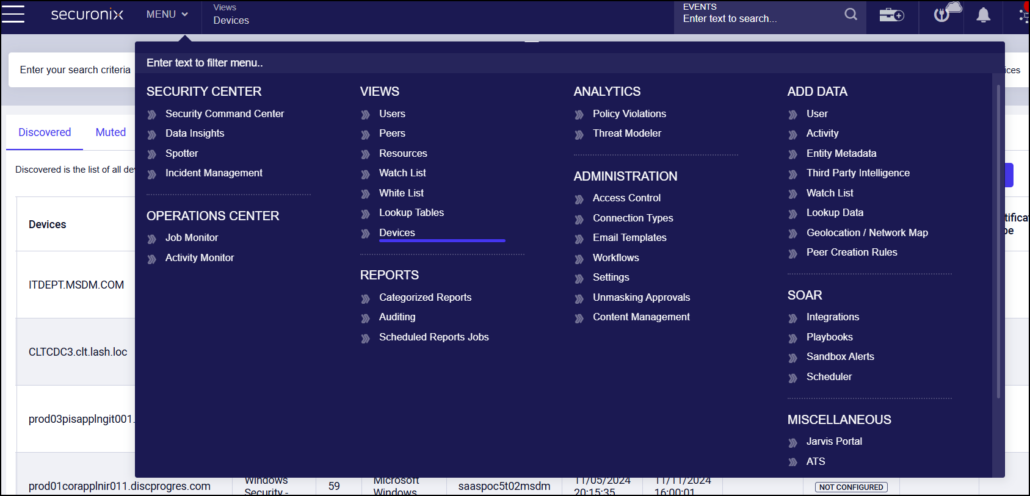
2. Securonix UEBA and AEBA

Best for: Teams adding behavior analytics to a SIEM or Microsoft Sentinel
Strengths: Intent signals, peer-group analytics, and privacy-aware investigations
Things to consider: Customization and custom connectors can take effort
Securonix UEBA and AEBA analyze behavior across users, entities, and AI agents and group related activity into a prioritized investigation. The analytics look for rare access, abnormal volume, unexpected sequences, privilege misuse, and deviations from individual or peer-group patterns. Findings are enriched with identity, asset, data sensitivity, and business context.
Insider threat detection for negligent, compromised, and malicious insiders is one of the listed use cases. The capabilities run inside Securonix Unified Defense SIEM, or can be added to Microsoft Sentinel through Securonix Threat Analytics, which applies UEBA and more than 2,400 maintained detections to telemetry already in Sentinel.
Key features include:
- Behavioral change detection: Identifies rare activity, unusual access, volume spikes, suspicious sequences, and deviations from individual or peer-group baselines.
- Contextual enrichment: Adds identity, ownership, asset, location, threat intelligence, and data sensitivity context to unusual activity to assess likelihood and potential impact.
- Insider Intent Agent: Correlates behavioral, linguistic, contextual, and AI-interaction signals with access patterns and data movement to surface behavioral drift and policy evasion.
- Privilege and data misuse analytics: Connects unusual access, privilege abuse, data movement, and communication activity to reveal potential exfiltration.
- Low-and-slow threat correlation: Correlates activity across systems and time to expose multi-stage risk that isolated rules and alerts can miss.
- Non-human identity monitoring: Tracks service accounts, autonomous agents, and digital workers, including tool use, API calls, prompts, and sensitive data interactions.
- Privacy-aware investigations: Supports data masking and filtering, role-based access, approval-based unmasking, and audit trails for cases shared with HR, legal, and compliance.
Limitations (as reported by users on PeerSpot):
- Customization effort: Users report that customization is harder than in other solutions, with log parsing and compatibility issues at the admin level.
- Custom connectors: Building connectors for internal or niche applications can be difficult.
- Third-party integration: Reviewers mention that integration with other tools, such as EDR products, could be improved.
- Reporting: Some users indicate that reporting capabilities need enhancement.
- Support responsiveness: Support quality is described as knowledgeable, but response times vary.

Source: Securonix
3. Gurucul AI-Powered Insider Risk Management
Best for: Regulated industries needing behavior analytics with DLP controls
Strengths: 450+ integrations, HR and sentiment context, real-time response
Things to consider: Alert severity tuning and documentation need work
Gurucul AI-Powered Insider Risk Management correlates activity across identity, access, location, endpoint, cloud, and business systems to detect data exfiltration, privilege abuse, and policy violations. It unifies signals from human users, machine identities, and AI agents, and enriches them with sentiment, HR, identity, security, cloud, and location telemetry.
The platform scores risk using multiple behavioral and contextual signals and includes an intelligent DLP module that classifies sensitive data on endpoints and blocks risky actions in real time. Gurucul supports more than 450 data source integrations and offers both agentless and agent-based deployment.
Key features include:
- Contextual signal enrichment: Adds sentiment, HR, identity, cloud, and location data to every user, machine, and AI signal to explain the circumstances behind an activity.
- Behavior-based data loss prevention: Classifies sensitive data as users interact with files or clipboard content, and blocks uploads, emails, USB copies, printing, or screenshots.
- Multi-signal risk scoring: Combines several behavioral and contextual signals into a risk score to distinguish normal activity from genuine risk.
- Identity threat reduction: Audits identity health to find compromised accounts and dormant “internal sleepers” before they move data.
- Automated response: Uses AI-driven triage and enrichment, then isolates users, revokes access, or escalates based on a preset risk appetite through IAM and endpoint integrations.
- Insider use case coverage: Includes detections for insider fraud, privileged access misuse, credential compromise, executive account monitoring, and misuse of service accounts and AI agents.
- Compliance and privacy controls: Provides compliance-mapped dashboards (CISA, NIST, GDPR, HIPAA), RBAC, PII masking, pseudonymization, and shared cases for security, HR, and legal teams.
Limitations (as reported by users on PeerSpot):
- Alert prioritization: Users report that alert severity assignment needs improvement and does not factor in asset or user criticality.
- Usability: Some reviewers would like the interface to be more user-friendly.
- Documentation: Online documentation could be more complete.
- Legacy integrations: Users mention difficulty integrating with legacy identity systems and network access control tools.
- Data enrichment: Reviewers note that data enrichment capabilities could be improved.

Source: Gurucul

Insider Risk Management and Data Protection Solutions
4. Microsoft Purview Insider Risk Management

Best for: Microsoft 365 environments that need built-in insider risk policies
Strengths: Policy templates without agents, pseudonymization, adaptive DLP
Things to consider: Third-party data sources need extra integration work
Microsoft Purview Insider Risk Management is part of the Microsoft Purview data security portfolio and correlates user activity signals to identify potential insider risks. Administrators can evaluate potential insider risks before configuring any policies, then create policies from customizable machine learning templates that require no scripting or endpoint agents.
Insider Risk Management works natively with Purview Data Loss Prevention, which can adjust protection levels based on user risk, and with Information Protection labels. Cases can launch pre-scoped data security investigations, and alerts connect to Microsoft Defender and Microsoft Sentinel. It is licensed as part of the Microsoft Purview Suite.
Key features include:
- Insider risk analytics: Evaluates potential insider risks across the organization without requiring any configured policies.
- Machine learning policy templates: Creates policies for key scenarios from customizable templates that need no scripting or endpoint agents.
- Adaptive protection: Feeds user risk levels into Purview Data Loss Prevention so protection controls adjust dynamically as a user’s risk changes.
- Pseudonymization and privacy controls: Manages data risks with pseudonymized user identities and access controls during reviews.
- Cross-team investigation workflows: Supports integrated workflows for security, human resources, and legal teams working on the same case.
- Data security investigations: Searches Microsoft 365 for incident-related documents, emails, Copilot prompts and responses, and Teams messages, with AI content analysis and data risk graphs.
- Security operations integration: Shares data and user risk context with Microsoft Defender, Microsoft Sentinel, and Security Copilot.
Limitations (as reported by users on G2):
- Third-party integration: Users report limited third-party log ingestion and connectors outside Microsoft services.
- Setup complexity: Reviewers note that configuration is complex and requires an experienced team to manage.
- False positives: Some users mention a high false positive rate from machine learning detections.
- Licensing cost: Pricing is described as expensive for smaller organizations.
- Policy propagation: Policy configuration changes can take time to apply to users and resources.

Source: Microsoft

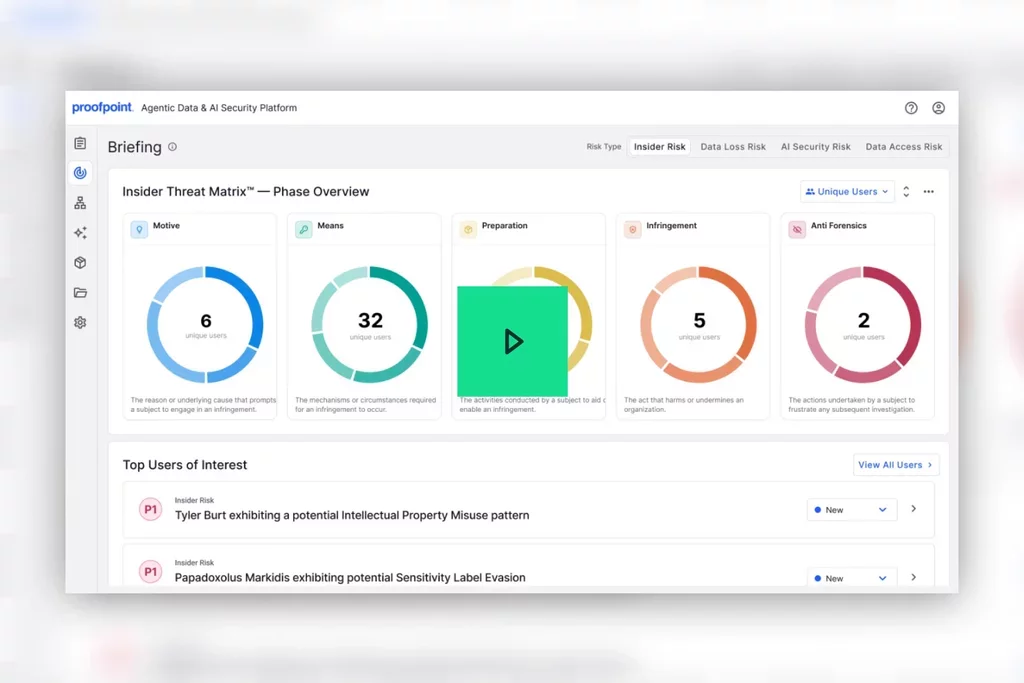
5. Proofpoint Insider Threat Management

Best for: Investigating careless, malicious, and compromised user activity
Strengths: User activity timelines, forensic screenshots, sentiment analysis
Things to consider: Short in-platform data retention noted by some users
Proofpoint Insider Threat Management identifies high-risk users by combining behavioral insights, user activity, data movement, and human risk signals across endpoints, browsers, cloud, email, and web channels. It covers careless, malicious, and compromised users and adds motive signals, such as sentiment in workplace communications, to behavior and data context.
Investigations use timelines of activity before, during, and after an incident, along with forensic screenshots. Adaptive controls block risky transfers to USB devices, cloud sync apps, web uploads, and GenAI tools, and the product can be combined with Proofpoint Enterprise DLP and Adaptive Email DLP.
Key features include:
- User activity monitoring: Shows user behavior in real time across endpoints, browsers, cloud, and email.
- Sentiment analysis: Analyzes workplace communications for early signals of motive.
- Prebuilt risk detections: Includes out-of-the-box alert libraries, prebuilt insider threat scenarios, and customizable detection rules.
- Adaptive risk monitoring: Increases monitoring when users take risky actions, combining behavior, identity, data, and motive.
- Timeline-based investigations: Displays activity before, during, and after an incident in one investigation workflow.
- Forensic evidence collection and sharing: Captures screenshots and activity context to validate careless or malicious behavior, and shares evidence with HR, legal, and compliance.
- Real-time data protection and coaching: Blocks risky transfers, adjusts policies based on risk indicators, and shows users in-the-moment notifications about safe data handling.
- Privacy and integrations: Provides anonymization, data masking, and role-based access, and integrates with SIEM and SOAR workflows through APIs and webhooks.
Limitations (as reported by users on G2):
- Data retention: Some users note that in-platform data covers only a short window, which limits historical investigations.
- False positives: Reviewers report false positives from unusual behavior during role changes and turnover, and noisy defaults that need tuning.
- Console at scale: Users mention that the console becomes difficult to work with at scale.
- Agent deployment: Agents cannot be deployed directly from the dashboard and require third-party deployment tools.
- Privacy concerns: Some users consider screen capture monitoring intrusive to employee privacy.

Source: Proofpoint
6. DTEX Platform

Best for: Distinguishing malicious, careless, and compromised user behavior
Strengths: 500+ metadata elements, intent-based risk models, pseudonymization
Things to consider: Custom enterprise pricing with no published tiers
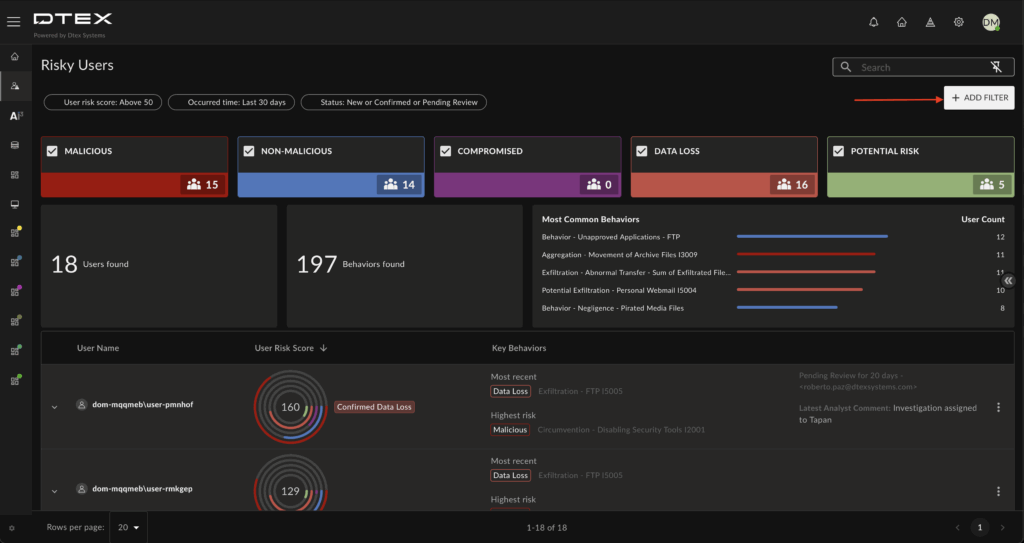
The DTEX Platform collects human-driven activity through lightweight endpoint forwarders and applies behavioral risk models to detect insider threats. It captures more than 500 metadata elements across 12 behavioral domains, 24×7, on and off the network, whether or not a rule is triggered.
Risk models map behavior patterns to intent categories, including malicious, non-malicious, and compromised actions, along with AI activity and data loss. The platform includes insider risk management, risk-adaptive DLP, user activity monitoring, and behavior analytics, plus AI agents for alert triage, threat hunting, and investigation support.
Key features include:
- Continuous telemetry collection: Records activity from endpoints 24×7, on and off network, without depending on rule triggers.
- Intent-based risk models: Differentiates between malicious, careless, and compromised behavior and aggregates behavior scores and stacked alerts.
- Dynamic risk scores: Baselines behavior by role, department, and geography, and separates human activity from AI activity.
- User timelines: Reconstructs digital activity across tools, AI, and endpoints into one chronological narrative.
- Complete data lineage: Keeps a history of every file in use, in motion, and at rest to show data movement and modifications.
- Risk-adaptive DLP: Combines data controls with behavioral risk signals and adjusts policies as user behavior and data sensitivity change.
- Pseudonymization: Removes personal identifiers from activity data to protect employee privacy and reduce investigator bias.
- Agentic defenders: Triage Guardian evaluates alerts and gathers evidence, Threat Hunter runs proactive hunts, and Risk Assistant summarizes behavioral context for analysts.
Limitations (based on publicly available sources):
- Pricing model: DTEX uses custom enterprise subscriptions without public pricing tiers, and one user rates it as not the cheapest option.
- Endpoint deployment: Full behavioral telemetry depends on deploying DTEX forwarders to endpoints.
- Limited independent reviews: Review volume outside Gartner Peer Insights is thin, which limits independent user feedback for evaluation.

Source: DTEX
7. Mimecast Incydr

Best for: Spotting data exfiltration by departing employees and shadow AI use
Strengths: Visibility without policies, adaptive controls, source code tracking
Things to consider: Initial configuration and alert tuning take time
Mimecast Incydr detects data exfiltration across email, endpoint, cloud, browser, and AI agent activity. It provides visibility from day one with no policies required, scores file movement for risk, and ties activity back to the person responsible.
Controls range from in-the-moment education to allow-with-justification and targeted blocking, and can be applied to scenarios such as departing employees, sensitive data movement, unsanctioned MCP connections, and shadow AI. Incydr integrates with HCM, EDR/XDR, and IAM tools for additional risk context and automated response.
Key features include:
- Unified exfiltration visibility: Shows exfiltration risk across email, endpoint, cloud, browser, and agentic channels from day one, scored and tied to individual users.
- Data insight dashboards: Covers AI agents, MCP connections, shadow AI, cloud storage, and source code movement, and uses MIP tags and AI Content Inspection to detect PII, PCI, and custom data.
- AI Rulebook: Shows how employees and departments use generative and agentic AI tools and whether usage is in-policy or at-risk.
- Adaptive controls: Applies education, justification prompts, or targeted blocking based on the level of risk.
- High-risk scenario protection: Applies controls to departing employees, sensitive data movement, and unsanctioned AI tools or agents.
- Agentic automation: Automates detection, configuration, and investigations with the Mihra agent or custom AI agents through an MCP gateway.
- Security stack integrations: Isolates endpoints in CrowdStrike, coordinates response through Palo Alto Networks Cortex XSOAR, and streams alerts and file events into Splunk.
- Lightweight agent: Uses an endpoint agent that consumes less than 1% of CPU and a browser extension that watches only for risky data movement.
Limitations (as reported by users on G2):
- Configuration complexity: Users report that onboarding, policy setup, and agent deployment in mixed Windows and Mac environments take significant effort.
- Alert tuning: Reviewers note a high number of false positives early on until thresholds are tuned.
- Reporting: Some users find reporting disconnected from alerting and want more dashboard customization.
- Pricing: Costs are described as scaling steeply with seat count.
- Workflow automation: Native SOAR playbooks are limited, so some teams build custom webhooks.

Source: Mimecast
8. Varonis Data Security Platform

Best for: Monitoring insider access to sensitive files across cloud and on-prem
Strengths: Hundreds of threat models, least privilege automation, 24×7 MDDR
Things to consider: Setup, initial scanning, and alert tuning take effort
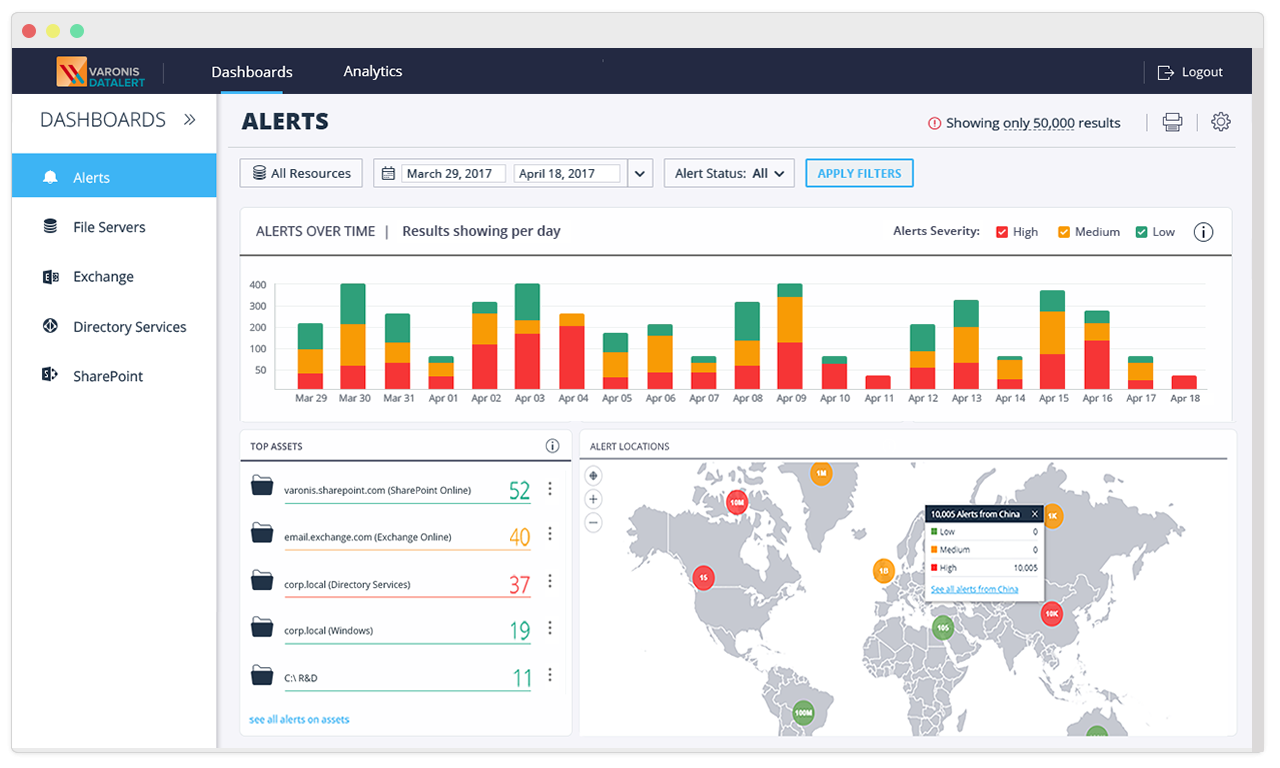
Varonis approaches insider risk from the data side by monitoring who accesses sensitive information and how it is used. Its data-centric UEBA builds behavior profiles for every user and device and applies hundreds of machine learning threat models to detect unusual file access, permission changes, removed labels, and geo-hopping.
Detection is combined with least privilege automation that reduces the blast radius of insider accounts, continuous risk assessment based on file sensitivity, access, and activity, and an optional 24x7x365 managed data detection and response (MDDR) service.
Key features include:
- Data-centric UEBA: Develops behavior baselines for every user and device and detects abnormal file access, email actions, permission changes, and geo-hopping.
- Data activity auditing: Monitors key indicators of compromise, including removal of labels or protections, and records file access events for searchable forensics.
- Exfiltration detection: Detects file uploads, downloads, and link sharing, and reveals command-and-control traffic in DNS, web proxy, and VPN logs.
- Least privilege automation: Identifies over-permissioned users and revokes risky entitlements at scale without manual intervention.
- Continuous risk assessment: Calculates effective permissions, including shared links and nested groups, and prioritizes remediation by risk.
- Managed data detection and response: Provides a 24x7x365 team that monitors data, investigates alerts, and escalates only incidents that need attention.
- SIEM and SOAR integrations: Connects to Splunk, QRadar, Palo Alto Networks Cortex XSOAR, and Google Chronicle SOAR, or sends events via syslog and SNMP.
Limitations (as reported by users on G2):
- Setup complexity: Users report a steep learning curve and complex setup, especially for smaller teams.
- Cost: Reviewers describe pricing as high, with costs adding up as more modules and data sources are covered.
- Initial scanning: Initial scans of large environments can take days or longer and demand substantial resources.
- Alert tuning: Alerts require careful baselining to reduce noise during deployment.
- Reporting: Some users find reporting restrictive and dashboard customization limited.

Source: Varonis
Conclusion
Detecting negligent and malicious insider threats requires combining behavioral analytics, user activity monitoring, and data protection controls to identify risky actions performed through legitimate access. Organizations should correlate identity, endpoint, network, and cloud activity to detect unusual behavior, suspicious data transfers, and potential privilege misuse. However, technical signals alone cannot reliably establish intent, so investigations must consider job responsibilities, business context, and supporting evidence.
Learn More About Exabeam
Learn about the Exabeam platform and expand your knowledge of information security with our collection of white papers, podcasts, webinars, and more.
- Webinar
The Insider Risk Program Just Got Bigger: How Digital Workers Are Changing Identity, Behavior, Ownership, and...
-
 Blog
What Is the Difference Between Exabeam and CrowdStrike for SIEM and Security Operations?
- Show More